
Artifactize

Build together on an Artifact Graph.

Artifactize brings human and agent work together and keeps your project consistent.

Who is it for?

  • People who want to build together with others, reviewing efficiently and developing in modules.
  • People who want to trust changes made by AI agents without overseeing every step.
  • People who want code, documents, images, and running applications to stay consistent as the project grows.
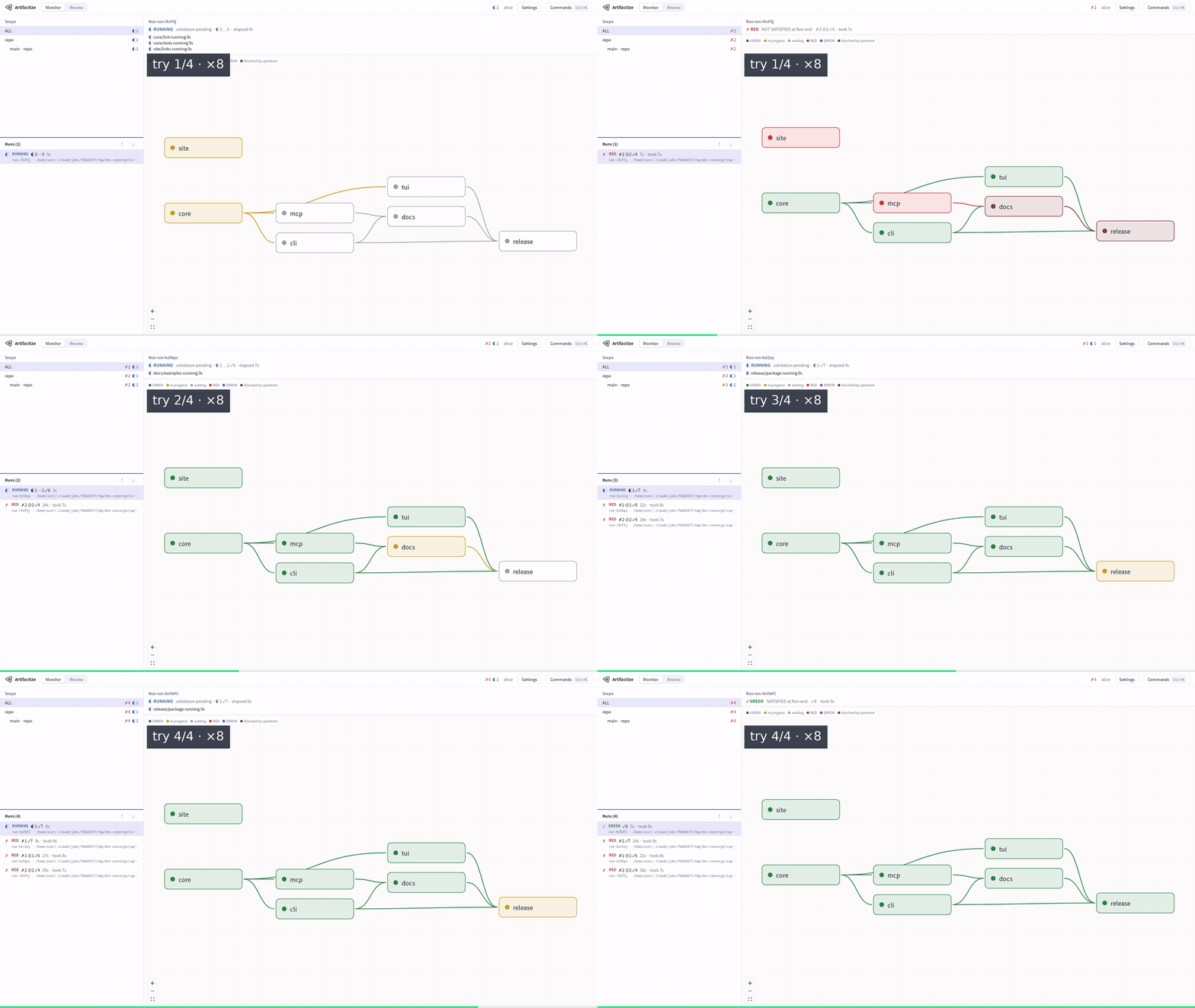
Real recording of the Artifactize desktop app over four Runs of an example project: failing parts turn red, are fixed between Runs, unchanged work is reused, and the fourth Run passes.
Each box is an Artifact, a piece of the project with its own checks; the lines between them make up the Artifact Graph. Real recording of the desktop app preview: four Runs of an example, eight times faster.

The story

Watch a project grow.

Each step below describes the project at that point; the animated graphic beside it shows the same.

01An idea

It starts with an idea.

A few notes on what to build. There is nothing to review yet.

One idea, with no checks.

02Artifacts

The plan and specification become Artifacts.

Choose pieces to review separately. An AI checks whether the specification covers the plan.

The plan and specification become two Artifacts with one AI review.

03Evals

Code arrives, and checks connect the parts.

Compare pieces with each other. Alice approves the specification before work builds on it.

The code is compared with the specification; Alice signs off the specification.

04Tests and style

Tests and a style review check the code.

Tests check the code. AI checks its style against a guide approved by Alice.

Tests, an AI style review and Alice’s approval are three different checks.

05Modules

The code splits into modules.

Give smaller code pieces their own checks so changes can be reviewed where they matter.

The code splits into three parts, each with its own tests and review.

06Beyond code

A website and docs pages join the graph.

Check writing and design too: compare the guides with the app connections they describe.

Documentation and website checks join, with Dana’s design approval.

07A change

Change one module, and only what depends on it runs again.

Change those app connections. Only their checks and the checks that use them run again.

The changed app connections and their users are checked again; unrelated results still apply.

08It keeps growing

New Artifacts and relations keep arriving.

Add new work and connections without redesigning the project’s review process.

A sync part, a brand guide and their checks join the project.

09Work in parallel

Work on your own copy of the project.

A shared review store lets teammates reuse reviews earned in each other’s project copies.

Alice, Bob and Carol work separately and share their review results.

10Merge and check

Bring changes together and check only what is new.

Bring changes together. The team checks review the new combinations and read shared results without changing them.

The combined project reuses existing reviews and checks the new combinations.
See it in the desktop app

Real projects, recorded in the app.

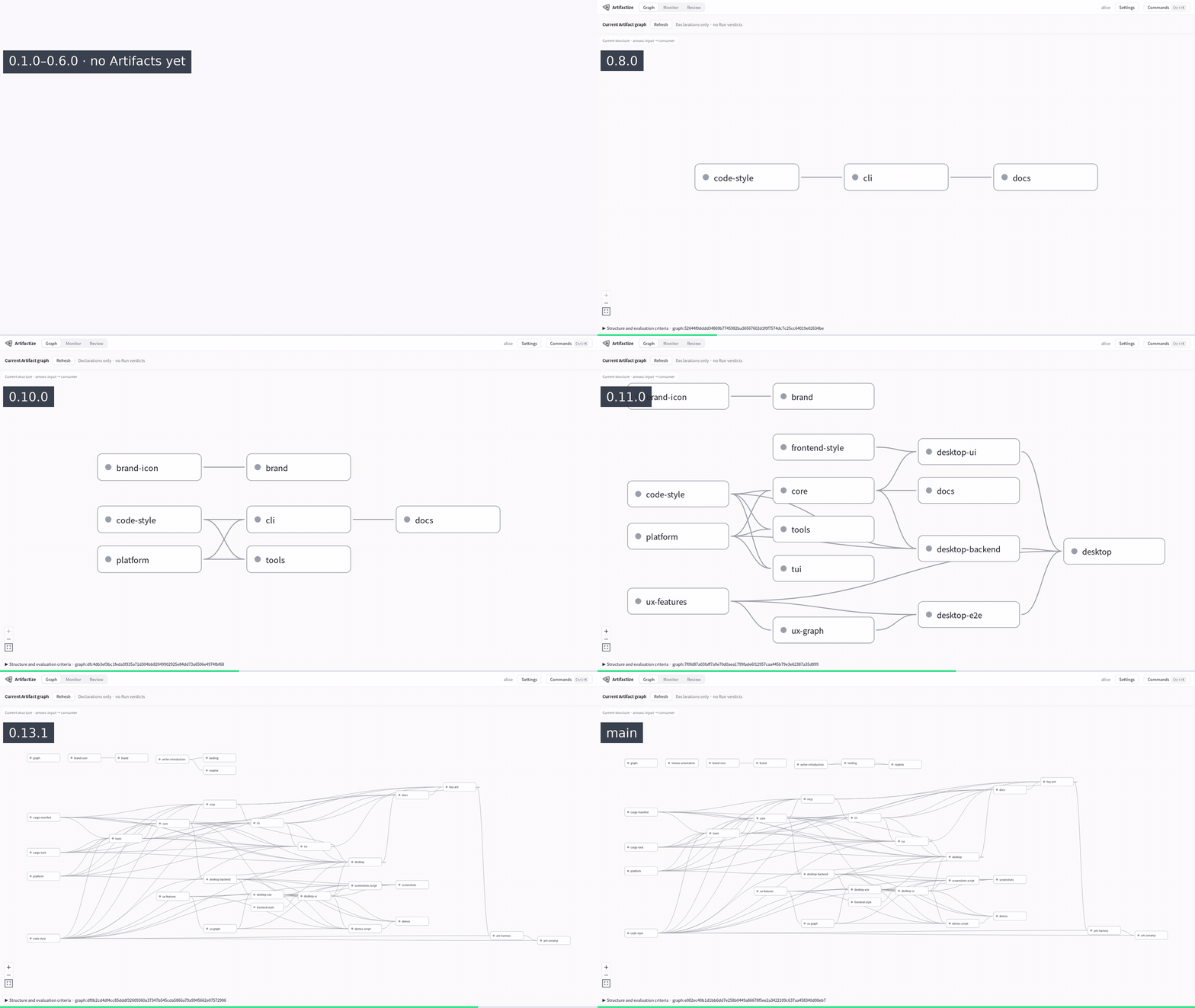
Both recordings come from the desktop app preview, played back faster.

Real recording of the Artifactize desktop app showing Artifactize's own project graph growing release by release, from 0.7.0 to the current release.
Artifactize’s own project graph, one step per release from 0.7.0 to today.

Get started

Try it in five minutes.

Artifactize is open source under the Apache License 2.0. It runs on Linux, macOS and Windows; the quick start reviews an example project without an AI account or provider access key.

# Linux (x86_64, aarch64): installs to ~/.local/bin, no sudo; on x86_64 also the desktop app
$ curl -fsSL https://artifactize.dev/install.sh | sh
$ artifactize --version
# macOS (Apple silicon, Intel) with Homebrew
$ brew install lhj6102/tap/artifactize
$ artifactize --version
# Without Homebrew: installs to ~/.local/bin and the app to ~/Applications, no sudo
$ curl -fsSL https://artifactize.dev/install.sh | sh

Download the Mac app One disk image for Apple silicon and Intel, checked by Apple. First launch offers to set up the Terminal command. With Homebrew, the app and the commands: brew install --cask lhj6102/tap/artifactize

# Windows x64 from the Microsoft Store, with the desktop app; then open a new terminal
PS> winget install 9PB6W4LL165D --source msstore
PS> artifactize --version
# Without the Store, in PowerShell with no administrator rights
PS> irm https://artifactize.dev/install.ps1 | iex

Or open Artifactize in the Microsoft Store. The PowerShell download is not code-signed, so Smart App Control may block it; the Store version is signed by Microsoft.